resolve-url-loader
Omschrijving
This webpack loader allows you to have a distributed set SCSS files and assets co-located with those SCSS files.
Do you organise your SCSS and assets by feature?
Where are your assets?
- ✅ I want my assets all over the place, next to my SCSS files.
- ❌ My assets are in a single directory.
How complicated is your SASS?
- ✅ I have a deep SASS composition with partials importing other partials.
- ✅ My asset paths are constructed by functions or
@mixins. - ❌ I have a single SCSS file. The asset paths are just explicit in that.
What asset paths are you using?
- ✅ Fully relative
url(./foo.png)orurl(foo.png) - ❌ Root relative
url(/foo.png) - ❌ Relative to some package or webpack root
url(~stuff/foo.png) - ❌ Relative to some variable which is your single asset directory
url($variable/foo.png)
What webpack errors are you getting?
- ✅ Webpack can’t find the relative asset
foo.png - ❌ Webpack says it doesn’t have a loader for
fully/resolved/path/foo.png
If you can tick at least 1 item in all of these questions then use this loader. It will allow webpack to find assets with fully relative paths.
If for any question you can’t tick any items then webpack should be able to already find your assets. You don’t need this loader.
Once webpack resolves your assets (even if it complains about loading them) then this loading is working correctly.
What’s the problem with SASS?
When you use fully relative paths in url() statements then Webpack expects to find those assets next to the root SCSS file, regardless of where you specify the url().
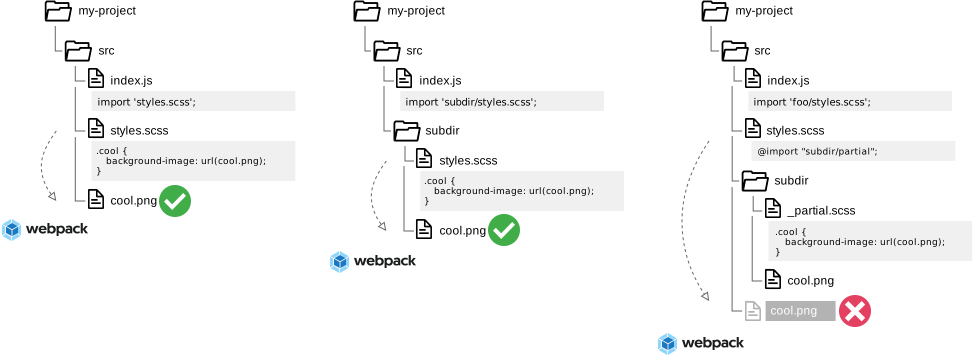
To illustrate here are 3 simple examples of SASS and Webpack without resolve-url-loader.

The first 2 cases are trivial and work fine. The asset is specified in the root SCSS file and Webpack finds it.
But any practical SASS composition will have nested SCSS files, as in the 3rd case. Here Webpack cannot find the asset.
Module not found: Can't resolve './cool.png' in '/absolute/path/.../my-project/src/styles.scss'
The path we present to Webpack really needs to be ./subdir/cool.png but we don’t want to write that in our SCSS.
Luckily we can use resolve-url-loader to do the url re-writing and make it work.
With functions and mixins and multiple nesting it gets more complicated. Read more detail in how the loader works.
Relations
| Item | Type |
|---|
Pointing items
| Item | Type | Category | Tags |
|---|
| Categorie | Package |
| Tags | loader, SCSS, webpack |
| URL | https://www.npmjs.com/package/resolve-url-loader |
| Type | Package |
| Time | |
| Price |